


In android with shapes we can create beautiful layouts.
Lets look at an example.
Create an xml named “gradient.xml” in your drawable folder and copy this code into it.
<?xml version="1.0" encoding="utf-8"?>
<shape
    xmlns:android="http://schemas.android.com/apk/res/android"
    android:shape="rectangle">
    <gradient
        android:angle="0"
        android:startColor="#000000"
        android:endColor="#000000"
        android:centerColor="#97CF4D" />
</shape>
Now the main layout file main.xml
<?xml version="1.0" encoding="utf-8"?>
<LinearLayout
    xmlns:android="http://schemas.android.com/apk/res/android"
    android:id="@+id/LinearLayout01"
    android:orientation="vertical"
    android:layout_width="fill_parent"
    android:layout_height="fill_parent"
    android:padding="10dp">

    <TextView
        android:text="Sample Text"
        android:id="@+id/text01"
        android:textSize="25sp"
        android:layout_margin="10dp"
        android:layout_width="wrap_content"
        android:layout_height="wrap_content">
    </TextView>
    <View
        android:layout_width="wrap_content"
        android:background="@drawable/gradient"
        android:layout_height="1dp"></View>
   <TextView
        android:text="Sample text"
        android:id="@+id/text02"
        android:textSize="25sp"
        android:layout_margin="10dp"
        android:layout_width="wrap_content"
        android:layout_height="wrap_content">
    </TextView>
    <View
        android:layout_width="wrap_content"
        android:background="@drawable/gradient"
        android:layout_height="1dp"></View>

    <EditText
        android:text=" "
        android:id="@+id/text03"
        android:textSize="25sp"
        android:layout_margin="10dp"
        android:layout_width="fill_parent"
        android:layout_height="wrap_content">
    </EditText>
    <View
        android:layout_width="wrap_content"
        android:background="@drawable/gradient"
        android:layout_height="1dp"></View>
</LinearLayout>
The main java file.
package pack.coderzheaven;

import android.app.Activity;
import android.os.Bundle;

public class DrawableShapesDemo extends Activity {
    @Override
    public void onCreate(Bundle savedInstanceState) {
        super.onCreate(savedInstanceState);
        setContentView(R.layout.main);
    }
}
Done. You can now run the application.
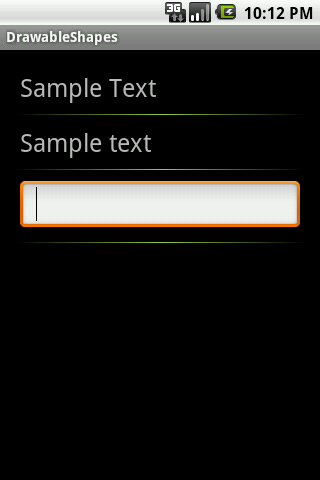
Using Shapes