


Hello everyone
Today I will explain how will you call a function that is defined inside the java android code from a webview.
For this we need to add a webviewclient in android for the WebView we are adding in the xml.
Then we have to register the webviewclient with the WebView we are creating using this method.
myWebView.setWebViewClient(new MyWebViewClient());
Now we will start….
Create a new project and name it WebViewDemo.
Now in the main.xml copy this code.
This file contains the webview only.
<?xml version="1.0" encoding="utf-8"?>
<WebView  xmlns:android="http://schemas.android.com/apk/res/android"
    android:id="@+id/webview"
    android:layout_width="fill_parent"
    android:layout_height="fill_parent"
/>
Now create a file named test.html inside the assets folder and copy this code into it. This is the html file that we are loading into the webview.
<?xml version="1.0" encoding="UTF-8"?>
<!DOCTYPE html PUBLIC "-//W3C//DTD XHTML Basic 1.1//EN"
    "http://www.w3.org/TR/xhtml-basic/xhtml-basic11.dtd">
<html>
<body>
<a href="http://www.coderzheaven.com">CoderzHeaven</a>
<input type="button" value="Click Me" onClick="showAndroidToast('Hello CoderzHeaven!')" />
<script type="text/javascript">
    function showAndroidToast(toast) {
    	Android.showToast(toast);
    }
</script>
</body>
</html>
Now in the java code refer the webview and load the html file
WebView myWebView;
 myWebView = (WebView) findViewById(R.id.webview);
 myWebView.loadUrl("file:///android_asset/test.html");
Now enable the javascript by calling this function
 WebSettings webSettings = myWebView.getSettings();
 webSettings.setJavaScriptEnabled(true);
Now we have to add the javascript interface for listening to the javascript functions that we define in the webview html file.
  myWebView.addJavascriptInterface(new JavaScriptInterface(this), "Android");

// outside oncreate
 public class JavaScriptInterface {
        Context mContext;

        /** Instantiate the interface and set the context */
        JavaScriptInterface(Context c) {
            mContext = c;
        }

        /** Show a toast from the web page */
        public void showToast(String toast) {
            Toast.makeText(mContext, toast, Toast.LENGTH_SHORT).show();
            startActivity(new Intent(WebViewDemo.this, WebViewDemo.class));
        }
    }
Now create a webview client for listening to the browser activities and doing specific function.
 myWebView.setWebViewClient(new MyWebViewClient());

 private class MyWebViewClient extends WebViewClient {
        @Override
        public boolean shouldOverrideUrlLoading(WebView view, String url) {
            if (Uri.parse(url).getHost().equals("www.coderzheaven.com")) {
               	Toast.makeText(getApplicationContext(), "www.coderzheaven.com", Toast.LENGTH_SHORT).show();
                return false;
            }
            // Otherwise, the link is not for a page on my site, so launch another Activity that handles URLs
            Intent intent = new Intent(Intent.ACTION_VIEW, Uri.parse(url));
            startActivity(intent);
            return true;
        }
    }
Now we listen to the backbutton.
 @Override
    public boolean onKeyDown(int keyCode, KeyEvent event) {
        // Check if the key event was the BACK key and if there's history
        if ((keyCode == KeyEvent.KEYCODE_BACK) && myWebView.canGoBack()) {
            myWebView.goBack();
            return true;
        }
        return super.onKeyDown(keyCode, event);
    }
Now the project is over . Now run and see the result.
Here is the full java code for this example
package com.coderzheaven.pack;

import android.app.Activity;
import android.content.Context;
import android.content.Intent;
import android.net.Uri;
import android.os.Bundle;
import android.view.KeyEvent;
import android.webkit.WebSettings;
import android.webkit.WebView;
import android.webkit.WebViewClient;
import android.widget.Toast;

public class WebViewDemo extends Activity {

	WebView myWebView;
    @Override
    public void onCreate(Bundle savedInstanceState) {

        super.onCreate(savedInstanceState);
        setContentView(R.layout.main);

        myWebView = (WebView) findViewById(R.id.webview);
        myWebView.loadUrl("file:///android_asset/test.html");
        WebSettings webSettings = myWebView.getSettings();
        webSettings.setJavaScriptEnabled(true);

        myWebView.addJavascriptInterface(new JavaScriptInterface(this), "Android");

       // myWebView.setWebViewClient(new WebViewClient());
        myWebView.setWebViewClient(new MyWebViewClient());
    }

    public class JavaScriptInterface {
        Context mContext;

        /** Instantiate the interface and set the context */
        JavaScriptInterface(Context c) {
            mContext = c;
        }

        /** Show a toast from the web page */
        public void showToast(String toast) {
            Toast.makeText(mContext, toast, Toast.LENGTH_SHORT).show();
            startActivity(new Intent(WebViewDemo.this, WebViewDemo.class));
        }
    }

    private class MyWebViewClient extends WebViewClient {
        @Override
        public boolean shouldOverrideUrlLoading(WebView view, String url) {
            if (Uri.parse(url).getHost().equals("www.google.com")) {
                // This is my web site, so do not override; let my WebView load the page
            	Toast.makeText(getApplicationContext(), "www.google.com", Toast.LENGTH_SHORT).show();
                return false;
            }
            // Otherwise, the link is not for a page on my site, so launch another Activity that handles URLs
            Intent intent = new Intent(Intent.ACTION_VIEW, Uri.parse(url));
            startActivity(intent);
            return true;
        }
    }

    @Override
    public boolean onKeyDown(int keyCode, KeyEvent event) {
        // Check if the key event was the BACK key and if there's history
        if ((keyCode == KeyEvent.KEYCODE_BACK) && myWebView.canGoBack()) {
            myWebView.goBack();
            return true;
        }
        // If it wasn't the BACK key or there's no web page history, bubble up to the default
        // system behavior (probably exit the activity)
        return super.onKeyDown(keyCode, event);
    }
}
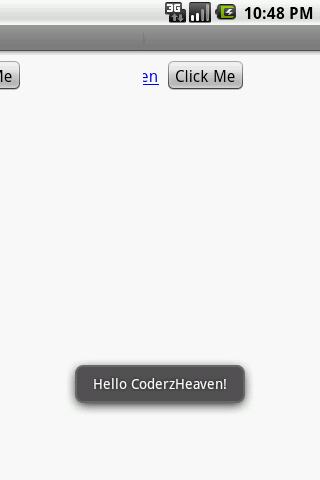
Calling an android function from javascript
please leave your valuable comments if this post was useful.
Awesome tutorial, just what I was looking for. Cheers!