


Hello all…..
In today’s post I will show you how to create a single selection list in android.
Here is the main.xml
<?xml version="1.0" encoding="utf-8"?>
<LinearLayout xmlns:android="http://schemas.android.com/apk/res/android"
    android:orientation="vertical"
    android:layout_width="fill_parent"
    android:layout_height="fill_parent">
     <ListView
		 	android:id="@android:id/list"
			android:cacheColorHint="#00000000"
			android:scrollbars="none"
			android:fadingEdge="vertical"
			android:soundEffectsEnabled="true"
			android:dividerHeight="1px"
			android:padding="5dip"
			android:smoothScrollbar="true"
		    android:layout_width="fill_parent"
		    android:layout_height="wrap_content"
		    android:drawSelectorOnTop="false"
		    android:layout_marginLeft="10dip"
		    android:layout_marginRight="10dip"
		    android:layout_marginBottom="10dip"
		    android:layout_weight="1"/>

</LinearLayout>
Now this line in the java file creates the single choice.
setListAdapter(new ArrayAdapter(this,
android.R.layout.simple_list_item_single_choice,
android.R.id.text1, names));
Now this is the full java code
package com.coderzheaven.pack;

import android.app.ListActivity;
import android.os.Bundle;
import android.widget.ArrayAdapter;
import android.widget.ListView;

public class ListView1 extends ListActivity {
    @Override
    public void onCreate(Bundle savedInstanceState) {
        super.onCreate(savedInstanceState);
        setContentView(R.layout.main);

        String[] names = new String[] { "Android", "Windows7", "Symbian", "iPhone",
        		"Android", "Windows7", "Symbian", "iPhone",
        		"Android", "Windows7", "Symbian", "iPhone" };
		setListAdapter(new ArrayAdapter<>(this,
				   android.R.layout.simple_list_item_single_choice,
					   android.R.id.text1, names));
		ListView listView = getListView();
		listView.setChoiceMode(ListView.CHOICE_MODE_SINGLE);

    }
}
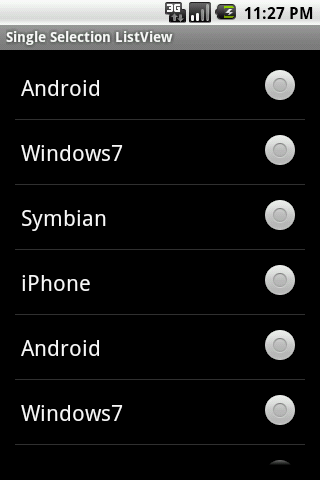
Single Choice ListView

Single Selection ListView in android