


Hello all..
Today I will show you how to align the message text to center in an AlertDialog. By default it is left aligned, so we have to get a reference to it to align it to center.This is how we do it.
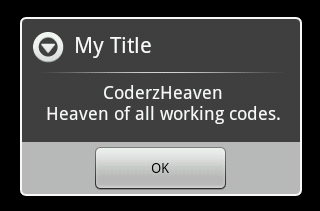
        AlertDialog.Builder builder = new AlertDialog.Builder(this);
        builder.setTitle("My Title");
        builder.setMessage("CoderzHeaven, Heaven of all working codes.");
        builder.setPositiveButton("OK", null);
        AlertDialog dialog = builder.show();
        TextView messageText = dialog.findViewById(android.R.id.message);
        messageText.setGravity(Gravity.CENTER);
Please leave your valuable comments on this post.
android.R.id.message works good for Message.
What is theandroid.R.id. for Title and List Items
You can check this link for more