


Hello all……
I have posted two posts on how to customize a progressbar in android.
1. Custom Indeterminate progressBar for android?
2. How to build a custom progressBar in android- Part 2?
Here is another one with update text on top of the progressbar.
Here is how we start.
After creating a fresh project create a new java file and name it “TextProgressBar.java”.
Now copy this code to the above file.
This file extends the progressbar to add additional functionality.
package com.coderzheaven.pack;

import android.content.Context;
import android.graphics.Canvas;
import android.graphics.Color;
import android.graphics.Paint;
import android.graphics.Rect;
import android.util.AttributeSet;
import android.widget.ProgressBar;

public class TextProgressBar extends ProgressBar {
	private String text;
	private Paint textPaint;

	public TextProgressBar(Context context) {
		super(context);
		text = "0/100";
		textPaint = new Paint();
		textPaint.setColor(Color.BLACK);
	}

	public TextProgressBar(Context context, AttributeSet attrs) {
		super(context, attrs);
		text = "0/100";
		textPaint = new Paint();
		textPaint.setColor(Color.BLACK);
	}

	public TextProgressBar(Context context, AttributeSet attrs, int defStyle) {
		super(context, attrs, defStyle);
		text = "0/100";
		textPaint = new Paint();
		textPaint.setColor(Color.BLACK);
	}

	@Override
	protected synchronized void onDraw(Canvas canvas) {
		super.onDraw(canvas);
		Rect bounds = new Rect();
		textPaint.getTextBounds(text, 0, text.length(), bounds);
		int x = getWidth() / 2 - bounds.centerX();
		int y = getHeight() / 2 - bounds.centerY();
		canvas.drawText(text, x, y, textPaint);
	}

	public synchronized void setText(String text) {
		this.text = text;
		drawableStateChanged();
	}

	public void setTextColor(int color) {
		textPaint.setColor(color);
		drawableStateChanged();
	}
}
OK the progressbar class is now complete.
Now the xml in which the progressbar contains.
main.xml
<?xml version="1.0" encoding="utf-8"?>
<LinearLayout xmlns:android="http://schemas.android.com/apk/res/android"
    android:orientation="vertical"
    android:layout_width="fill_parent"
    android:layout_height="fill_parent"
    >
	<TextView
	    android:layout_width="fill_parent"
	    android:layout_height="wrap_content"
	    android:text="Custom ProgressBar Demo from CoderzHeaven"
	    android:textStyle="bold"
	    android:layout_margin="10dp"
    />

	<com.coderzheaven.pack.TextProgressBar
		android:id="@+id/pb"
		android:layout_width="fill_parent"
		android:layout_height="wrap_content"
		android:max="100"
		android:progress="0"
		style="?android:attr/progressBarStyleHorizontal"
		android:maxHeight="20dip"
		android:minHeight="20dip"
	/>

</LinearLayout>
Take a look at this line in the xml
This adds the custom progressbar in the xml.
OK Done now we have to just implement in the custom progressbar.
Now the main java file that is calling the progressbar.
package com.coderzheaven.pack;

import android.app.Activity;
import android.os.Bundle;
import android.os.Handler;
import android.os.Message;

public class CustomProgressBarDemo extends Activity {

	int myProgress = 0;
	TextProgressBar pb;

    @Override
    public void onCreate(Bundle savedInstanceState) {
        super.onCreate(savedInstanceState);
        setContentView(R.layout.main);

        pb = new TextProgressBar(this);
        pb = (TextProgressBar) findViewById(R.id.pb);
        new Thread(myThread).start();
    }

    private Runnable myThread = new Runnable(){
	  @Override
	  public void run() {
		   while (myProgress<100){
			    try{
			    	System.out.println("SSS");
			    	pb.setProgress(myProgress);
			    	pb.setText(myProgress+"/100");
			    	myHandle.sendMessage(myHandle.obtainMessage());
			    	Thread.sleep(500);
			    }
			    catch(Throwable t){
			    }
		   }
	  }

	  Handler myHandle = new Handler(){
		   @Override
		   public void handleMessage(Message msg) {
		    myProgress++;
			pb.setProgress(myProgress);
			pb.setText(myProgress+"/100");
		   }
	  };
	};
}
OK Go on and run the project you will get these results.
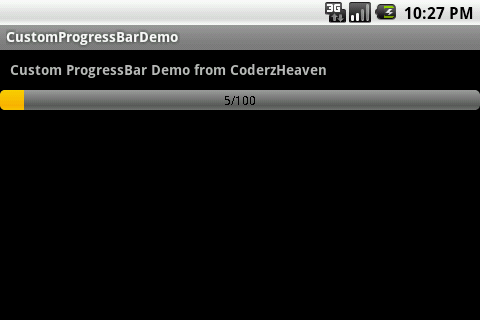
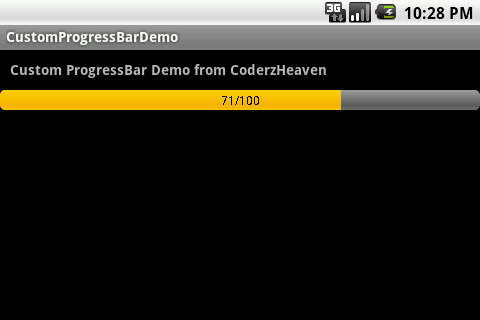
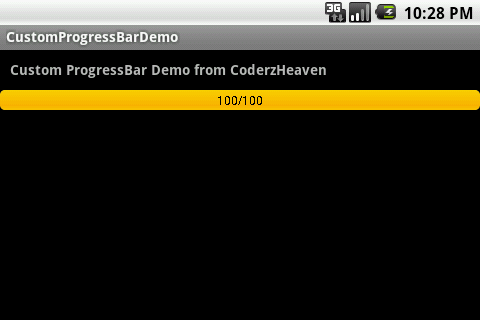
thanks.
android.view.InflateException: Binary XML file line #621: Binary XML file line #621: Error inflating class com.coderzheaven.pack.TextProgressBar
This error will shown …
how to resolve com.coderzheaven.pack.TextProgressBar
plz include ur dependency