


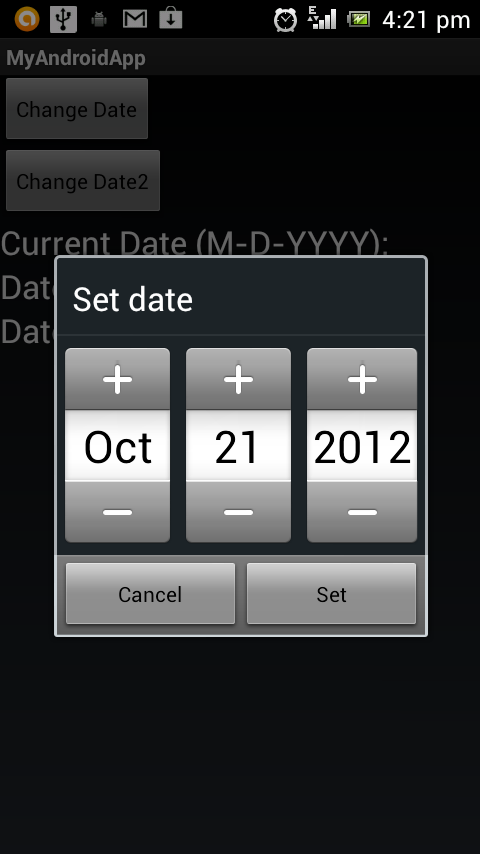
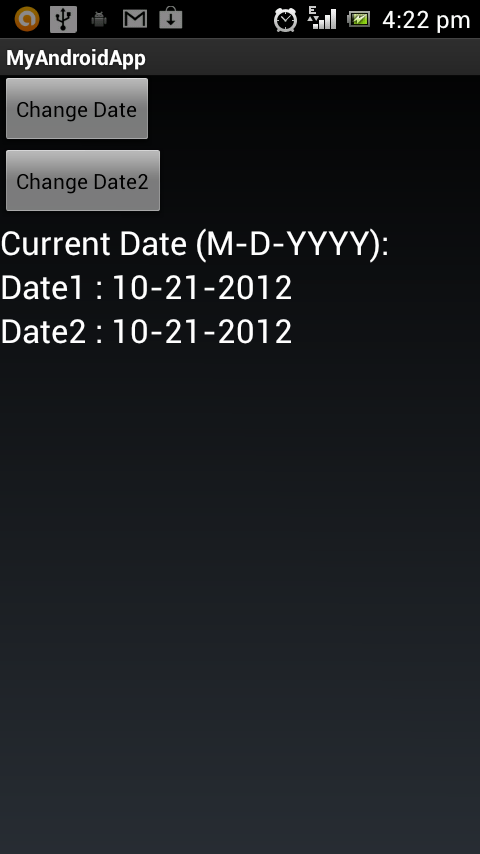
In android for each time picker Dialog we can associate with a dialog. So with this dialog and a global variable we can have any number of Dialog listeners. Here is the sample java code.
This is the layout file – main.xml
<?xml version="1.0" encoding="utf-8"?>
<LinearLayout xmlns:android="http://schemas.android.com/apk/res/android"
    android:layout_width="fill_parent"
    android:layout_height="fill_parent"
    android:orientation="vertical" >

    <Button
        android:id="@+id/btnChangeDate"
        android:layout_width="wrap_content"
        android:layout_height="wrap_content"
        android:text="Change Date" />

     <Button
        android:id="@+id/btnChangeDate2"
        android:layout_width="wrap_content"
        android:layout_height="wrap_content"
        android:text="Change Date2" />

    <TextView
        android:id="@+id/lblDate"
        android:layout_width="wrap_content"
        android:layout_height="wrap_content"
        android:text="Current Date (M-D-YYYY): "
        android:textAppearance="?android:attr/textAppearanceLarge" />

    <TextView
        android:id="@+id/tvDate"
        android:layout_width="wrap_content"
        android:layout_height="wrap_content"
        android:text=""
        android:textAppearance="?android:attr/textAppearanceLarge" />

     <TextView
        android:id="@+id/tvDate2"
        android:layout_width="wrap_content"
        android:layout_height="wrap_content"
        android:text=""
        android:textAppearance="?android:attr/textAppearanceLarge" />

</LinearLayout>
MyAndroidAppActivity .java
import java.util.Calendar;
import android.app.Activity;
import android.app.DatePickerDialog;
import android.app.Dialog;
import android.os.Bundle;
import android.view.View;
import android.view.View.OnClickListener;
import android.widget.Button;
import android.widget.DatePicker;
import android.widget.TextView;

public class MyAndroidAppActivity extends Activity {

	private TextView tvDisplayDate, tvDisplayDate2;
	private DatePicker dpResult;
	private Button btnChangeDate, btnChangeDate2;

	private int year;
	private int month;
	private int day;

	static final int DATE_DIALOG_ID = 1;
	static final int DATE_DIALOG_ID2 = 2;
	int cur = 0;

	@Override
	public void onCreate(Bundle savedInstanceState) {
		super.onCreate(savedInstanceState);
		setContentView(R.layout.main);

		setCurrentDateOnView();
		addListenerOnButton();

	}

	// display current date
	public void setCurrentDateOnView() {

		tvDisplayDate = (TextView) findViewById(R.id.tvDate);
		tvDisplayDate2 = (TextView) findViewById(R.id.tvDate2);

		final Calendar c = Calendar.getInstance();
		year = c.get(Calendar.YEAR);
		month = c.get(Calendar.MONTH);
		day = c.get(Calendar.DAY_OF_MONTH);

		// set current date into textview
		tvDisplayDate.setText(new StringBuilder()
				// Month is 0 based, just add 1
				.append(month + 1).append("-").append(day).append("-")
				.append(year).append(" "));

		tvDisplayDate2.setText(tvDisplayDate.getText().toString());
	}

	public void addListenerOnButton() {

		btnChangeDate = (Button) findViewById(R.id.btnChangeDate);

		btnChangeDate.setOnClickListener(new OnClickListener() {

			@Override
			public void onClick(View v) {

				showDialog(DATE_DIALOG_ID);

			}

		});
		btnChangeDate2 = (Button) findViewById(R.id.btnChangeDate2);

		btnChangeDate2.setOnClickListener(new OnClickListener() {

			@Override
			public void onClick(View v) {

				showDialog(DATE_DIALOG_ID2);

			}

		});

	}

	@Override
	protected Dialog onCreateDialog(int id) {
		switch (id) {

		case DATE_DIALOG_ID:
			System.out.println("onCreateDialog  : " + id);
			cur = DATE_DIALOG_ID;
			// set date picker as current date
			return new DatePickerDialog(this, datePickerListener, year, month,
					day);
		case DATE_DIALOG_ID2:
			cur = DATE_DIALOG_ID2;
			System.out.println("onCreateDialog2  : " + id);
			// set date picker as current date
			return new DatePickerDialog(this, datePickerListener, year, month,
					day);

		}
		return null;
	}

	private DatePickerDialog.OnDateSetListener datePickerListener = new DatePickerDialog.OnDateSetListener() {

		// when dialog box is closed, below method will be called.
		public void onDateSet(DatePicker view, int selectedYear,
				int selectedMonth, int selectedDay) {

			year = selectedYear;
			month = selectedMonth;
			day = selectedDay;

			if(cur == DATE_DIALOG_ID){
				// set selected date into textview
				tvDisplayDate.setText("Date1 : " + new StringBuilder().append(month + 1)
						.append("-").append(day).append("-").append(year)
						.append(" "));
			}
			else{
				tvDisplayDate2.setText("Date2 : " + new StringBuilder().append(month + 1)
						.append("-").append(day).append("-").append(year)
						.append(" "));
			}

		}
	};

}
Please leave your valuable comments on this post.