


This is a sample tutorial for creating custom tabs that look like android tabs may be beautiful than that with buttons and styles.
Here is the sample code for that.
package pack.coderzheaven;

import android.app.Activity;
import android.os.Bundle;

public class DrawableDemo extends Activity {
    @Override
    public void onCreate(Bundle savedInstanceState) {
        super.onCreate(savedInstanceState);
        setContentView(R.layout.main);
    }
}
This is the layout for the tabs
<merge xmlns:android="http://schemas.android.com/apk/res/android">
<LinearLayout
	android:id="@+id/bottom_tab_layout"
    android:layout_width="fill_parent"
    android:layout_height="wrap_content"
    android:orientation="horizontal"
    android:gravity="center_horizontal"
    android:background="@drawable/black_gradiant"
    >
 <Button
  	android:layout_height="wrap_content"
  	android:id="@+id/home"
  	android:text="Home"
  	android:layout_width="fill_parent"
  	android:textStyle="bold"
  	android:textSize="8sp"
  	android:layout_weight="1"
  	android:textColor="@drawable/black"
  	android:drawableTop="@drawable/home"
  	android:background="@drawable/custom_gradiant"
  	android:padding="2dp"
  	android:layout_marginRight="2dp"
  	android:gravity="center|bottom">
  </Button>

   <Button
  	android:layout_height="wrap_content"
  	android:id="@+id/media"
  	android:text="Video"
  	android:layout_width="fill_parent"
  	android:textStyle="bold"
  	android:textSize="8sp"
  	android:layout_weight="1"
  	android:textColor="@drawable/black"
  	android:drawableTop="@drawable/video"
  	android:background="@drawable/custom_gradiant"
  	android:padding="2dp"
  	android:layout_marginRight="2dp"
  	android:gravity="center|bottom">
  </Button>

   <Button
  	android:layout_height="wrap_content"
  	android:id="@+id/news_letter"
  	android:text="Audio"
  	android:layout_width="fill_parent"
  	android:textStyle="bold"
  	android:textSize="8sp"
  	android:layout_weight="1"
  	android:textColor="@drawable/black"
  	android:drawableTop="@drawable/audio"
  	android:background="@drawable/custom_gradiant"
  	android:padding="2dp"
  	android:layout_marginRight="2dp"
  	android:gravity="center|bottom">
  </Button>

   <Button
  	android:layout_height="wrap_content"
  	android:id="@+id/news_letter"
  	android:text="Mail"
  	android:layout_width="fill_parent"
  	android:textStyle="bold"
  	android:textSize="8sp"
  	android:layout_weight="1"
  	android:textColor="@drawable/black"
  	android:drawableTop="@drawable/email"
  	android:background="@drawable/custom_gradiant"
  	android:padding="2dp"
  	android:gravity="center|bottom">
  </Button>
</LinearLayout>
</merge>
The main.xml file that includes the tab layout.
<?xml version="1.0" encoding="utf-8"?>
<RelativeLayout xmlns:android="http://schemas.android.com/apk/res/android"
    android:orientation="vertical"
    android:layout_width="fill_parent"
    android:layout_height="fill_parent"
    >

   <Button
  	android:layout_height="wrap_content"
  	android:id="@+id/home"
  	android:text="Custom Android Tabs by CoderzHeaven"
  	android:layout_width="fill_parent"
  	android:textStyle="bold"
  	android:textSize="20sp"
  	android:layout_weight="1"
  	android:textColor="@drawable/black"
  	android:padding="5dp"
  	android:gravity="center">
  </Button>

 <LinearLayout
     	android:id="@+id/l1"
	    android:layout_width="fill_parent"
	    android:layout_height="wrap_content"
	    android:gravity="center_horizontal"
	    android:layout_alignParentBottom="true">

    <include layout="@layout/footer_tabs"/>
 </LinearLayout>
 </RelativeLayout>
Note : Please include the resources as needed.
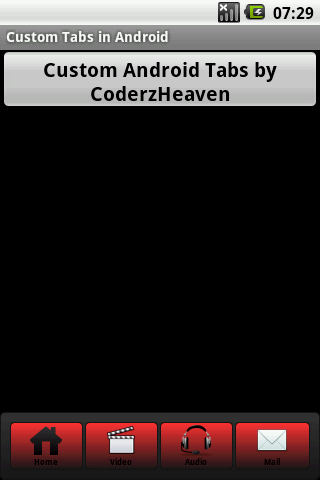
Custom Tabs in Android
Please leave your valuable comments of you found this post useful.
Complete source code can be found here
tricky…but nice:-)